> ## Documentation Index
> Fetch the complete documentation index at: https://wiki.agnes-ai.com/llms.txt
> Use this file to discover all available pages before exploring further.
# Agnes 2.5 Pro Beta
> Integrate Agnes 2.5 Pro Beta for advanced reasoning, coding, long-context analysis, agentic workflows, and multimodal understanding.
Agnes 2.5 Pro Beta is now available through the Agnes AI API. It uses the same request parameters, response formats, supported text protocols, and context limits as the other Agnes 2.5 Pro models. Its pricing is listed below.
`agnes-2.5-pro-beta`
Chat Completions: `POST /v1/chat/completions`
Responses: `POST /v1/responses`
Messages: `POST /v1/messages`
Paid reasoning model with text and image input.
Evaluated on the Artificial Analysis intelligence and agentic benchmark suite.
## Overview
Agnes 2.5 Pro Beta is intended for production workloads that need stronger reasoning depth than flash-class models, including complex code tasks, science and math reasoning, long-context understanding, knowledge-intensive Q\&A, and agentic terminal or workflow tasks.
It uses the same base integration pattern as other Agnes text models:
| Item | Value |
| ---------------- | -------------------------------- |
| Base URL | `https://apihub.agnes-ai.com/v1` |
| Endpoint | `POST /v1/chat/completions` |
| Model name | `agnes-2.5-pro-beta` |
| Input modalities | Text and image URL |
| Output modality | Text |
| Availability | Available |
| Billing | Paid model |
The request and response examples on this page use the live model ID `agnes-2.5-pro-beta`. Before calling it, confirm that the model is enabled for your Agnes AI account.
## Core Capabilities
Suitable for scientific reasoning, knowledge-intensive questions, and multi-step analysis.
Designed for code generation, debugging, refactoring, test generation, and agentic coding workflows.
Handles long documents, structured context, and multi-turn reasoning tasks.
Accepts image URL inputs for visual analysis and multimodal reasoning.
Supports OpenAI-compatible function calling and external tool orchestration.
Supports streaming responses for interactive product experiences.
## Artificial Analysis Results
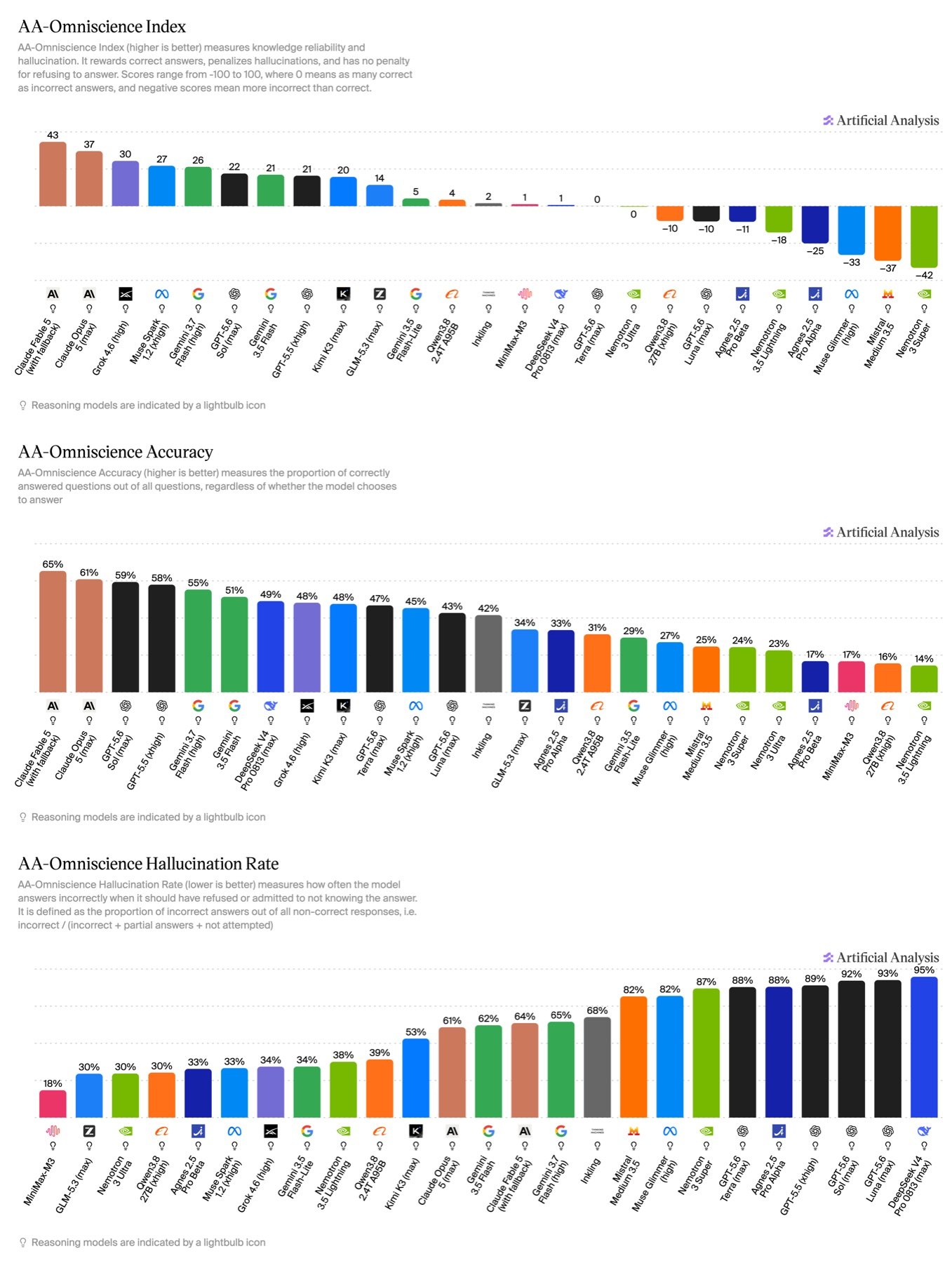
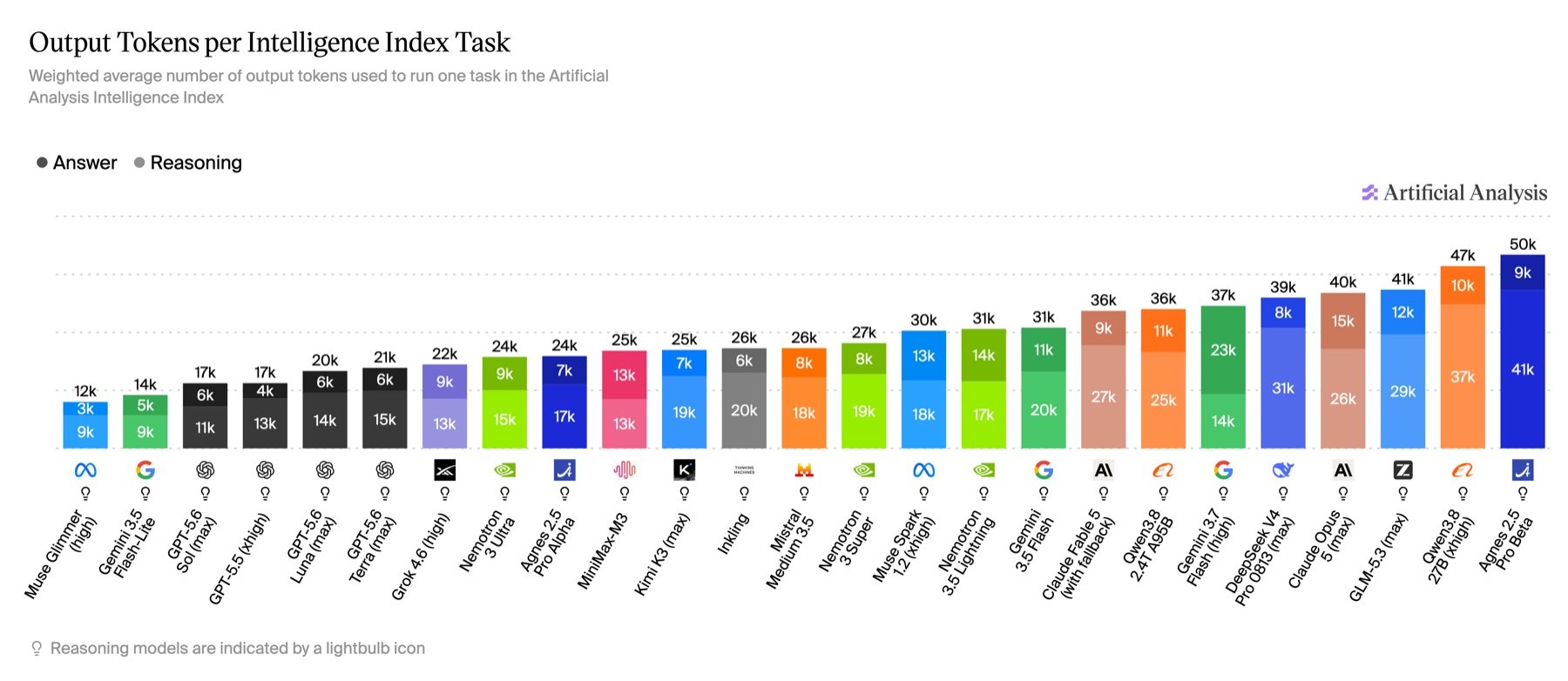
The following launch snapshot was measured by Artificial Analysis. Leaderboard positions and scores may change as the evaluation suite and competing models are updated.
| Metric | Score |
| ----------------------------------------- | ------------------------------------------: |
| Intelligence Index | `49` |
| Agentic Index | `44` |
| GDPval-AA v2 Elo | `1456` |
| GDPval-AA v2 | `48%` |
| τ³-Banking | `36%` |
| Terminal-Bench v2.1 | `70%` |
| SciCode | `48%` |
| Humanity's Last Exam | `38%` |
| GPQA Diamond | `91%` |
| CritPt | `16%` |
| AA-Omniscience Accuracy | `17%` |
| AA-Omniscience Non-Hallucination Rate | `67%` |
| AA-LCR | `78%` |
| Output tokens per Intelligence Index task | `50k` total (`41k` answer + `9k` reasoning) |
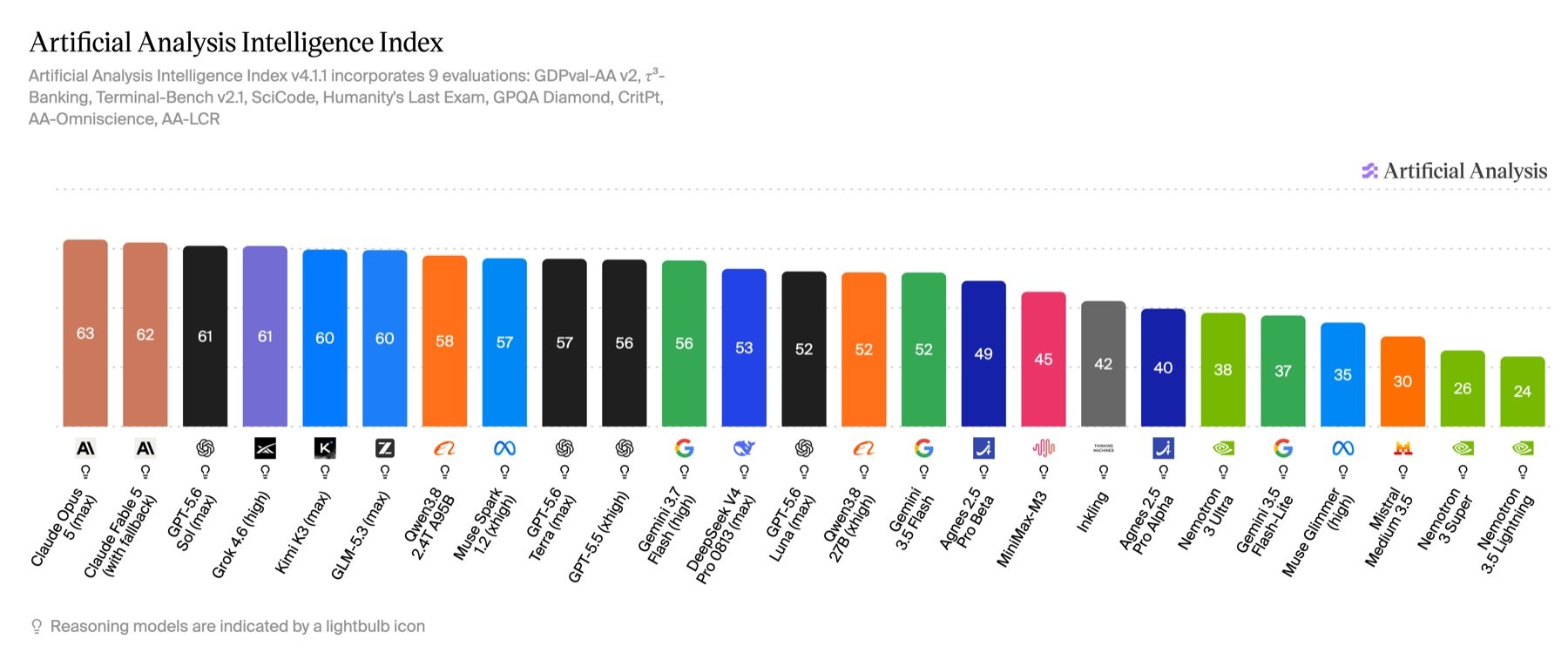
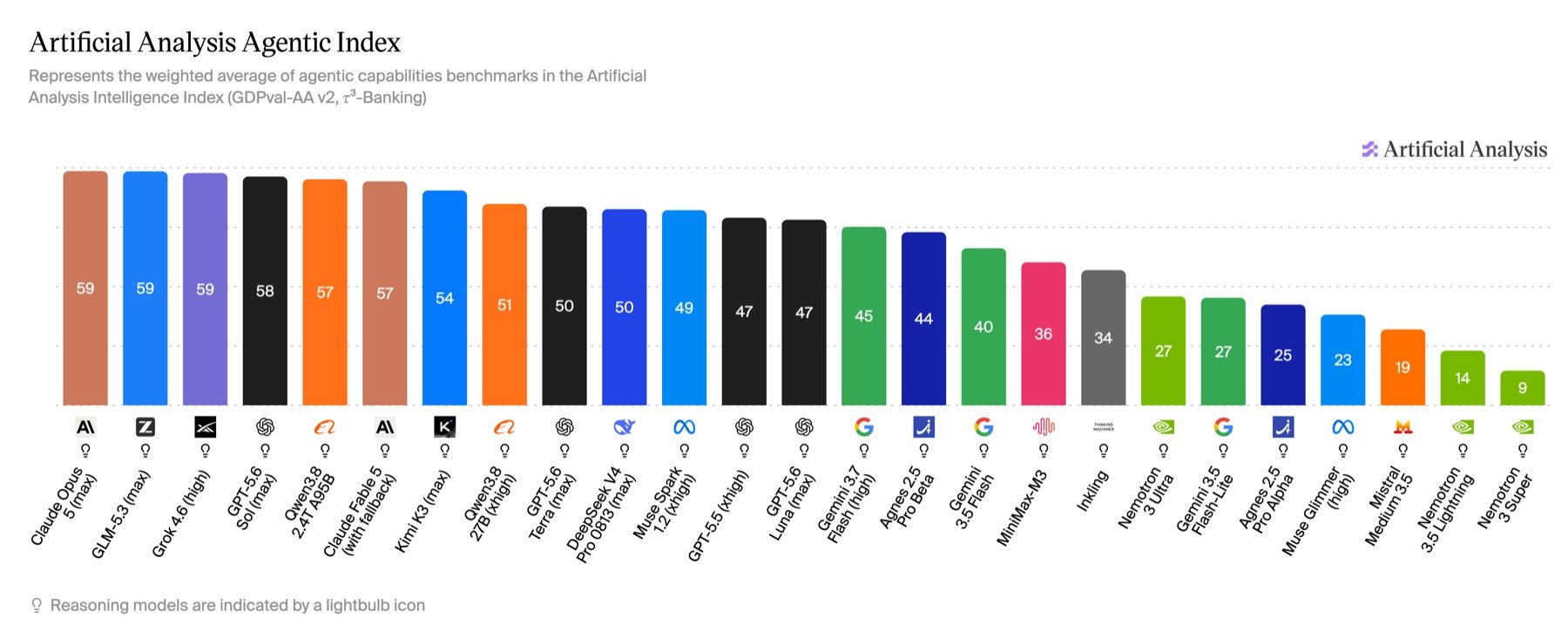
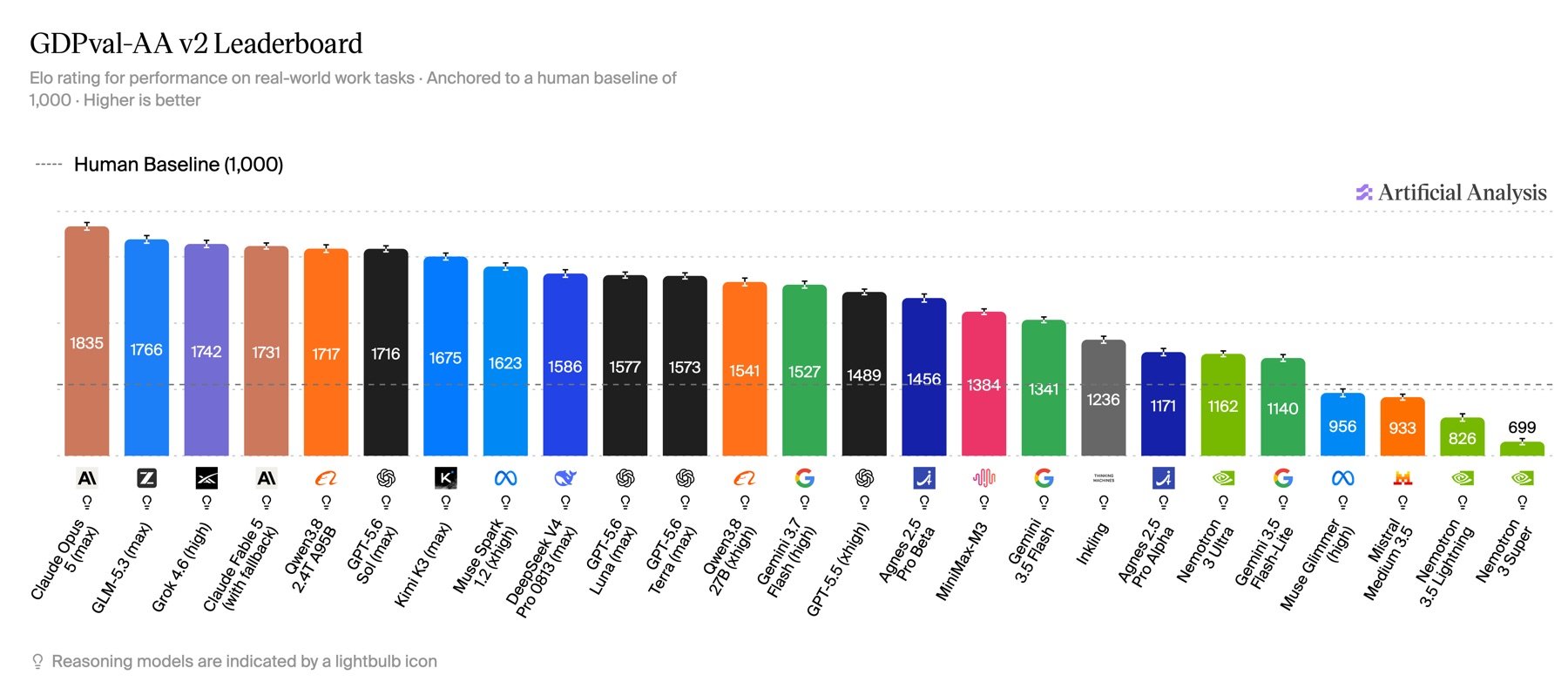
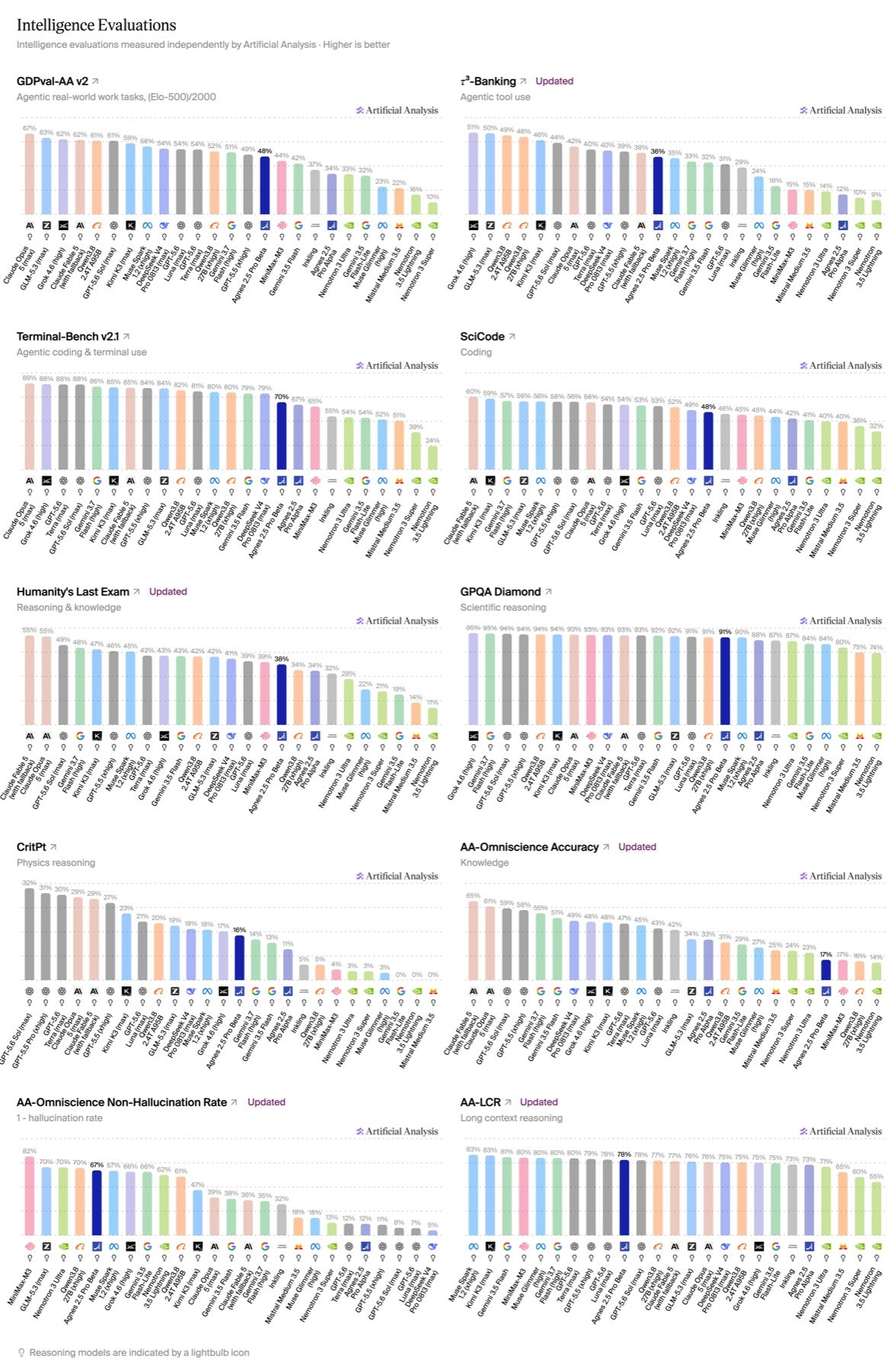
 View the current Artificial Analysis leaderboard. Live scores and ordering may differ from this launch snapshot.
## API Reference
### Endpoint
```text theme={null}
POST https://apihub.agnes-ai.com/v1/chat/completions
```
### Headers
```bash theme={null}
-H "Authorization: Bearer YOUR_API_KEY"
-H "Content-Type: application/json"
```
### Request Parameters
| Parameter | Type | Required | Description |
| ---------------------- | --------------- | -------- | ------------------------------------------------------------------------------------------------------ |
| `model` | string | Yes | Model name. Use `agnes-2.5-pro-beta`. |
| `messages` | array | Yes | Conversation messages, including `system`, `user`, and `assistant` messages. |
| `messages[].content` | string / array | Yes | Message content. It can be plain text or an array of content blocks containing `text` and `image_url`. |
| `temperature` | number | No | Controls randomness. Lower values produce more deterministic output. |
| `top_p` | number | No | Controls nucleus sampling. |
| `max_tokens` | number | No | Maximum number of tokens to generate in the response. |
| `stream` | boolean | No | Whether to enable streaming output. |
| `tools` | array | No | Tool definitions for tool-calling workflows. |
| `tool_choice` | string / object | No | Controls whether and how the model uses tools. |
| `chat_template_kwargs` | object | No | Extension field for OpenAI-compatible requests. |
| `thinking` | object | No | Field for enabling Thinking mode in Anthropic-compatible requests. |
## Image URL Input
Agnes 2.5 Pro Beta supports text and image URL inputs in the same `messages` request.
```json theme={null}
{
"role": "user",
"content": [
{
"type": "text",
"text": "Analyze this architecture diagram and identify possible failure points."
},
{
"type": "image_url",
"image_url": {
"url": "https://example.com/diagram.png"
}
}
]
}
```
## Request Examples
```bash theme={null}
curl https://apihub.agnes-ai.com/v1/chat/completions \
-H "Authorization: Bearer YOUR_API_KEY" \
-H "Content-Type: application/json" \
-d '{
"model": "agnes-2.5-pro-beta",
"messages": [
{
"role": "system",
"content": "You are a precise technical assistant."
},
{
"role": "user",
"content": "Explain the tradeoffs between optimistic locking and pessimistic locking in distributed systems."
}
],
"temperature": 0.3,
"max_tokens": 1200
}'
```
```bash theme={null}
curl https://apihub.agnes-ai.com/v1/chat/completions \
-H "Authorization: Bearer YOUR_API_KEY" \
-H "Content-Type: application/json" \
-d '{
"model": "agnes-2.5-pro-beta",
"messages": [
{
"role": "user",
"content": "Review this TypeScript API handler for security issues, explain the risks, and provide a corrected version."
}
],
"temperature": 0.2,
"max_tokens": 2000
}'
```
```bash theme={null}
curl https://apihub.agnes-ai.com/v1/chat/completions \
-H "Authorization: Bearer YOUR_API_KEY" \
-H "Content-Type: application/json" \
-d '{
"model": "agnes-2.5-pro-beta",
"messages": [
{
"role": "user",
"content": "Create a step-by-step migration plan for moving a monolith to services."
}
],
"stream": true
}'
```
```bash theme={null}
curl https://apihub.agnes-ai.com/v1/chat/completions \
-H "Authorization: Bearer YOUR_API_KEY" \
-H "Content-Type: application/json" \
-d '{
"model": "agnes-2.5-pro-beta",
"messages": [
{
"role": "user",
"content": [
{
"type": "text",
"text": "Summarize this chart and call out any anomalies."
},
{
"type": "image_url",
"image_url": {
"url": "https://example.com/chart.png"
}
}
]
}
]
}'
```
## Response Format
```json theme={null}
{
"id": "chatcmpl_xxx",
"object": "chat.completion",
"created": 1784899200,
"model": "agnes-2.5-pro-beta",
"choices": [
{
"index": 0,
"message": {
"role": "assistant",
"content": "..."
},
"finish_reason": "stop"
}
],
"usage": {
"prompt_tokens": 120,
"completion_tokens": 300,
"total_tokens": 420
}
}
```
### Response Fields
| Field | Type | Description |
| --------------------------- | ------- | --------------------------------------- |
| `id` | string | Unique ID of the completion request. |
| `object` | string | Object type, usually `chat.completion`. |
| `created` | integer | Request timestamp. |
| `model` | string | Model used for the request. |
| `choices` | array | List of generated responses. |
| `choices[].message.role` | string | Role of the message sender. |
| `choices[].message.content` | string | Content generated by the model. |
| `choices[].finish_reason` | string | Reason generation stopped. |
| `usage` | object | Token usage information. |
## Responses API
In addition to Chat Completions, this model supports the OpenAI Responses API. Use `input` instead of `messages`.
### Responses endpoint
```text theme={null}
POST https://apihub.agnes-ai.com/v1/responses
```
### Responses request parameters
| Parameter | Type | Required | Description |
| ------------------- | -------------- | -------- | ------------------------------------------------------------------------------------------------- |
| `model` | string | Yes | Model name. Use `agnes-2.5-pro-beta`. |
| `input` | string / array | Yes | A plain text prompt or an array of structured input messages. |
| `max_output_tokens` | integer | No | Maximum output budget. Use a larger value for reasoning models to avoid an `incomplete` response. |
```bash theme={null}
curl https://apihub.agnes-ai.com/v1/responses \
-H "Authorization: Bearer YOUR_API_KEY" \
-H "Content-Type: application/json" \
-d '{
"model": "agnes-2.5-pro-beta",
"input": "Explain how autonomous agents use tools.",
"max_output_tokens": 1024
}'
```
```bash theme={null}
curl https://apihub.agnes-ai.com/v1/responses \
-H "Authorization: Bearer YOUR_API_KEY" \
-H "Content-Type: application/json" \
-d '{
"model": "agnes-2.5-pro-beta",
"input": [
{
"role": "user",
"content": [
{
"type": "input_text",
"text": "Explain how autonomous agents use tools."
}
]
}
],
"max_output_tokens": 1024
}'
```
### Responses output format
```json theme={null}
{
"id": "resp_xxx",
"object": "response",
"status": "completed",
"model": "agnes-2.5-pro-beta",
"output": [
{
"type": "reasoning",
"summary": []
},
{
"type": "message",
"role": "assistant",
"status": "completed",
"content": [
{
"type": "output_text",
"text": "Autonomous agents use tools to retrieve data and perform actions."
}
]
}
],
"usage": {
"input_tokens": 40,
"output_tokens": 80,
"total_tokens": 120
},
"error": null,
"incomplete_details": null
}
```
| Field | Type | Description |
| ------------------------- | ------------- | ------------------------------------------------------------------- |
| `id` | string | Unique response ID. |
| `object` | string | Object type, usually `response`. |
| `status` | string | Response state, such as `completed` or `incomplete`. |
| `output` | array | Ordered response items, including reasoning and assistant messages. |
| `output[].type` | string | Item type, such as `reasoning` or `message`. |
| `output[].content[].type` | string | Content type. Generated text uses `output_text`. |
| `output[].content[].text` | string | Generated assistant text. |
| `usage` | object | Token usage information. |
| `error` | object / null | Error details when the request fails. |
| `incomplete_details` | object / null | Explains why a response stopped before completion. |
The current response does not include a top-level `output_text` convenience field. Extract generated text from message items where `output[].type` is `message` and `output[].content[].type` is `output_text`.
Reasoning items are optional and can use either `content[].reasoning_text` or `summary[].summary_text`. Token usage field names can also vary by model: support both `input_tokens` / `output_tokens` and `prompt_tokens` / `completion_tokens`.
If `status` is `incomplete`, inspect `incomplete_details` and retry with a larger `max_output_tokens` value. Reasoning models can consume part of the output budget before producing assistant text.
## Messages API
This model also supports the Anthropic-compatible Messages API. Send conversation input in `messages` and authenticate with `x-api-key`.
### Messages endpoint
```text theme={null}
POST https://apihub.agnes-ai.com/v1/messages
```
### Messages headers
```bash theme={null}
-H "x-api-key: YOUR_API_KEY"
-H "anthropic-version: 2023-06-01"
-H "Content-Type: application/json"
```
### Messages request parameters
| Parameter | Type | Required | Description |
| -------------------- | -------------- | -------- | ------------------------------------------------------------------------- |
| `model` | string | Yes | Model name. Use `agnes-2.5-pro-beta`. |
| `max_tokens` | integer | Yes | Maximum number of output tokens. Use a larger value for reasoning models. |
| `messages` | array | Yes | Conversation messages containing `user` and `assistant` roles. |
| `messages[].role` | string | Yes | Message role. Use `user` or `assistant`. |
| `messages[].content` | string / array | Yes | Plain text or an array of Anthropic-compatible content blocks. |
| `system` | string / array | No | System instruction for the request. |
| `temperature` | number | No | Controls output randomness. |
| `stream` | boolean | No | Whether to return a streaming response. |
### Messages request example
```bash theme={null}
curl https://apihub.agnes-ai.com/v1/messages \
-H "x-api-key: YOUR_API_KEY" \
-H "anthropic-version: 2023-06-01" \
-H "Content-Type: application/json" \
-d '{
"model": "agnes-2.5-pro-beta",
"max_tokens": 1024,
"system": "You are a helpful AI assistant.",
"messages": [
{
"role": "user",
"content": "Explain how autonomous agents use tools."
}
]
}'
```
### Messages response format
```json theme={null}
{
"id": "msg_xxx",
"type": "message",
"role": "assistant",
"model": "agnes-2.5-pro-beta",
"content": [
{
"type": "text",
"text": "Autonomous agents use tools to retrieve information and perform actions."
}
],
"stop_reason": "end_turn",
"usage": {
"input_tokens": 290,
"cache_creation_input_tokens": 0,
"cache_read_input_tokens": 0,
"output_tokens": 28
}
}
```
| Field | Type | Description |
| ----------------------------------- | ------- | -------------------------------------------------------------- |
| `id` | string | Unique message ID. |
| `type` | string | Object type, usually `message`. |
| `role` | string | Response role, usually `assistant`. |
| `model` | string | Model used for the request. |
| `content` | array | Ordered response content blocks. |
| `content[].type` | string | Content block type. Generated text uses `text`. |
| `content[].text` | string | Generated assistant text. |
| `stop_reason` | string | Reason generation stopped, such as `end_turn` or `max_tokens`. |
| `usage.input_tokens` | integer | Number of input tokens used. |
| `usage.output_tokens` | integer | Number of output tokens generated. |
| `usage.cache_creation_input_tokens` | integer | Input tokens written to the prompt cache. |
| `usage.cache_read_input_tokens` | integer | Input tokens read from the prompt cache. |
Read generated text from content blocks where `content[].type` is `text`. If `stop_reason` is `max_tokens`, retry with a larger `max_tokens` value.
## Limits and Pricing
Agnes 2.5 Pro Beta is a paid model. Its token prices are the same as the other Agnes 2.5 Pro models, and usage is billed by cache read, input, and output tokens.
| Item | Value |
| ----------------- | ---------------------------- |
| Context window | `1M` tokens |
| Max output | `65536` tokens |
| Input modalities | Text, image |
| Output modalities | Text |
| Reasoning | Yes |
| Model weights | Proprietary, not open source |
| Type | USD Price |
| ---------------------------- | -----------------: |
| Input cache hit / Cache Read | `$0.01 / M tokens` |
| Input cache miss / Input | `$0.10 / M tokens` |
| Output | `$0.30 / M tokens` |
The cached-input price is 10% of the regular input-token price. Pricing and availability may vary by account, region, billing configuration, or later pricing updates. Use the Agnes AI platform dashboard as the source of truth for your account.
## Best Practices
Use Agnes 2.5 Pro Beta for tasks where correctness and multi-step reasoning matter more than raw latency, such as scientific reasoning, complex policy analysis, and long-form technical planning.
Provide the target language, framework, existing code, error messages, expected behavior, and constraints. Ask for root-cause analysis before the patch when debugging complex issues.
Use structured sections, filenames, or document labels inside the prompt so the model can refer to sources and produce traceable conclusions.
## Integration Checklist
Use `agnes-2.5-pro-beta` as the model name.
Confirm that your Agnes AI account has access to Agnes 2.5 Pro Beta.
Basic chat completion requests must include `model` and `messages`.
Use publicly accessible `image_url` values for image inputs.
Track cache read, input, and output token usage because this is a paid model.
View the current Artificial Analysis leaderboard. Live scores and ordering may differ from this launch snapshot.
## API Reference
### Endpoint
```text theme={null}
POST https://apihub.agnes-ai.com/v1/chat/completions
```
### Headers
```bash theme={null}
-H "Authorization: Bearer YOUR_API_KEY"
-H "Content-Type: application/json"
```
### Request Parameters
| Parameter | Type | Required | Description |
| ---------------------- | --------------- | -------- | ------------------------------------------------------------------------------------------------------ |
| `model` | string | Yes | Model name. Use `agnes-2.5-pro-beta`. |
| `messages` | array | Yes | Conversation messages, including `system`, `user`, and `assistant` messages. |
| `messages[].content` | string / array | Yes | Message content. It can be plain text or an array of content blocks containing `text` and `image_url`. |
| `temperature` | number | No | Controls randomness. Lower values produce more deterministic output. |
| `top_p` | number | No | Controls nucleus sampling. |
| `max_tokens` | number | No | Maximum number of tokens to generate in the response. |
| `stream` | boolean | No | Whether to enable streaming output. |
| `tools` | array | No | Tool definitions for tool-calling workflows. |
| `tool_choice` | string / object | No | Controls whether and how the model uses tools. |
| `chat_template_kwargs` | object | No | Extension field for OpenAI-compatible requests. |
| `thinking` | object | No | Field for enabling Thinking mode in Anthropic-compatible requests. |
## Image URL Input
Agnes 2.5 Pro Beta supports text and image URL inputs in the same `messages` request.
```json theme={null}
{
"role": "user",
"content": [
{
"type": "text",
"text": "Analyze this architecture diagram and identify possible failure points."
},
{
"type": "image_url",
"image_url": {
"url": "https://example.com/diagram.png"
}
}
]
}
```
## Request Examples
```bash theme={null}
curl https://apihub.agnes-ai.com/v1/chat/completions \
-H "Authorization: Bearer YOUR_API_KEY" \
-H "Content-Type: application/json" \
-d '{
"model": "agnes-2.5-pro-beta",
"messages": [
{
"role": "system",
"content": "You are a precise technical assistant."
},
{
"role": "user",
"content": "Explain the tradeoffs between optimistic locking and pessimistic locking in distributed systems."
}
],
"temperature": 0.3,
"max_tokens": 1200
}'
```
```bash theme={null}
curl https://apihub.agnes-ai.com/v1/chat/completions \
-H "Authorization: Bearer YOUR_API_KEY" \
-H "Content-Type: application/json" \
-d '{
"model": "agnes-2.5-pro-beta",
"messages": [
{
"role": "user",
"content": "Review this TypeScript API handler for security issues, explain the risks, and provide a corrected version."
}
],
"temperature": 0.2,
"max_tokens": 2000
}'
```
```bash theme={null}
curl https://apihub.agnes-ai.com/v1/chat/completions \
-H "Authorization: Bearer YOUR_API_KEY" \
-H "Content-Type: application/json" \
-d '{
"model": "agnes-2.5-pro-beta",
"messages": [
{
"role": "user",
"content": "Create a step-by-step migration plan for moving a monolith to services."
}
],
"stream": true
}'
```
```bash theme={null}
curl https://apihub.agnes-ai.com/v1/chat/completions \
-H "Authorization: Bearer YOUR_API_KEY" \
-H "Content-Type: application/json" \
-d '{
"model": "agnes-2.5-pro-beta",
"messages": [
{
"role": "user",
"content": [
{
"type": "text",
"text": "Summarize this chart and call out any anomalies."
},
{
"type": "image_url",
"image_url": {
"url": "https://example.com/chart.png"
}
}
]
}
]
}'
```
## Response Format
```json theme={null}
{
"id": "chatcmpl_xxx",
"object": "chat.completion",
"created": 1784899200,
"model": "agnes-2.5-pro-beta",
"choices": [
{
"index": 0,
"message": {
"role": "assistant",
"content": "..."
},
"finish_reason": "stop"
}
],
"usage": {
"prompt_tokens": 120,
"completion_tokens": 300,
"total_tokens": 420
}
}
```
### Response Fields
| Field | Type | Description |
| --------------------------- | ------- | --------------------------------------- |
| `id` | string | Unique ID of the completion request. |
| `object` | string | Object type, usually `chat.completion`. |
| `created` | integer | Request timestamp. |
| `model` | string | Model used for the request. |
| `choices` | array | List of generated responses. |
| `choices[].message.role` | string | Role of the message sender. |
| `choices[].message.content` | string | Content generated by the model. |
| `choices[].finish_reason` | string | Reason generation stopped. |
| `usage` | object | Token usage information. |
## Responses API
In addition to Chat Completions, this model supports the OpenAI Responses API. Use `input` instead of `messages`.
### Responses endpoint
```text theme={null}
POST https://apihub.agnes-ai.com/v1/responses
```
### Responses request parameters
| Parameter | Type | Required | Description |
| ------------------- | -------------- | -------- | ------------------------------------------------------------------------------------------------- |
| `model` | string | Yes | Model name. Use `agnes-2.5-pro-beta`. |
| `input` | string / array | Yes | A plain text prompt or an array of structured input messages. |
| `max_output_tokens` | integer | No | Maximum output budget. Use a larger value for reasoning models to avoid an `incomplete` response. |
```bash theme={null}
curl https://apihub.agnes-ai.com/v1/responses \
-H "Authorization: Bearer YOUR_API_KEY" \
-H "Content-Type: application/json" \
-d '{
"model": "agnes-2.5-pro-beta",
"input": "Explain how autonomous agents use tools.",
"max_output_tokens": 1024
}'
```
```bash theme={null}
curl https://apihub.agnes-ai.com/v1/responses \
-H "Authorization: Bearer YOUR_API_KEY" \
-H "Content-Type: application/json" \
-d '{
"model": "agnes-2.5-pro-beta",
"input": [
{
"role": "user",
"content": [
{
"type": "input_text",
"text": "Explain how autonomous agents use tools."
}
]
}
],
"max_output_tokens": 1024
}'
```
### Responses output format
```json theme={null}
{
"id": "resp_xxx",
"object": "response",
"status": "completed",
"model": "agnes-2.5-pro-beta",
"output": [
{
"type": "reasoning",
"summary": []
},
{
"type": "message",
"role": "assistant",
"status": "completed",
"content": [
{
"type": "output_text",
"text": "Autonomous agents use tools to retrieve data and perform actions."
}
]
}
],
"usage": {
"input_tokens": 40,
"output_tokens": 80,
"total_tokens": 120
},
"error": null,
"incomplete_details": null
}
```
| Field | Type | Description |
| ------------------------- | ------------- | ------------------------------------------------------------------- |
| `id` | string | Unique response ID. |
| `object` | string | Object type, usually `response`. |
| `status` | string | Response state, such as `completed` or `incomplete`. |
| `output` | array | Ordered response items, including reasoning and assistant messages. |
| `output[].type` | string | Item type, such as `reasoning` or `message`. |
| `output[].content[].type` | string | Content type. Generated text uses `output_text`. |
| `output[].content[].text` | string | Generated assistant text. |
| `usage` | object | Token usage information. |
| `error` | object / null | Error details when the request fails. |
| `incomplete_details` | object / null | Explains why a response stopped before completion. |
The current response does not include a top-level `output_text` convenience field. Extract generated text from message items where `output[].type` is `message` and `output[].content[].type` is `output_text`.
Reasoning items are optional and can use either `content[].reasoning_text` or `summary[].summary_text`. Token usage field names can also vary by model: support both `input_tokens` / `output_tokens` and `prompt_tokens` / `completion_tokens`.
If `status` is `incomplete`, inspect `incomplete_details` and retry with a larger `max_output_tokens` value. Reasoning models can consume part of the output budget before producing assistant text.
## Messages API
This model also supports the Anthropic-compatible Messages API. Send conversation input in `messages` and authenticate with `x-api-key`.
### Messages endpoint
```text theme={null}
POST https://apihub.agnes-ai.com/v1/messages
```
### Messages headers
```bash theme={null}
-H "x-api-key: YOUR_API_KEY"
-H "anthropic-version: 2023-06-01"
-H "Content-Type: application/json"
```
### Messages request parameters
| Parameter | Type | Required | Description |
| -------------------- | -------------- | -------- | ------------------------------------------------------------------------- |
| `model` | string | Yes | Model name. Use `agnes-2.5-pro-beta`. |
| `max_tokens` | integer | Yes | Maximum number of output tokens. Use a larger value for reasoning models. |
| `messages` | array | Yes | Conversation messages containing `user` and `assistant` roles. |
| `messages[].role` | string | Yes | Message role. Use `user` or `assistant`. |
| `messages[].content` | string / array | Yes | Plain text or an array of Anthropic-compatible content blocks. |
| `system` | string / array | No | System instruction for the request. |
| `temperature` | number | No | Controls output randomness. |
| `stream` | boolean | No | Whether to return a streaming response. |
### Messages request example
```bash theme={null}
curl https://apihub.agnes-ai.com/v1/messages \
-H "x-api-key: YOUR_API_KEY" \
-H "anthropic-version: 2023-06-01" \
-H "Content-Type: application/json" \
-d '{
"model": "agnes-2.5-pro-beta",
"max_tokens": 1024,
"system": "You are a helpful AI assistant.",
"messages": [
{
"role": "user",
"content": "Explain how autonomous agents use tools."
}
]
}'
```
### Messages response format
```json theme={null}
{
"id": "msg_xxx",
"type": "message",
"role": "assistant",
"model": "agnes-2.5-pro-beta",
"content": [
{
"type": "text",
"text": "Autonomous agents use tools to retrieve information and perform actions."
}
],
"stop_reason": "end_turn",
"usage": {
"input_tokens": 290,
"cache_creation_input_tokens": 0,
"cache_read_input_tokens": 0,
"output_tokens": 28
}
}
```
| Field | Type | Description |
| ----------------------------------- | ------- | -------------------------------------------------------------- |
| `id` | string | Unique message ID. |
| `type` | string | Object type, usually `message`. |
| `role` | string | Response role, usually `assistant`. |
| `model` | string | Model used for the request. |
| `content` | array | Ordered response content blocks. |
| `content[].type` | string | Content block type. Generated text uses `text`. |
| `content[].text` | string | Generated assistant text. |
| `stop_reason` | string | Reason generation stopped, such as `end_turn` or `max_tokens`. |
| `usage.input_tokens` | integer | Number of input tokens used. |
| `usage.output_tokens` | integer | Number of output tokens generated. |
| `usage.cache_creation_input_tokens` | integer | Input tokens written to the prompt cache. |
| `usage.cache_read_input_tokens` | integer | Input tokens read from the prompt cache. |
Read generated text from content blocks where `content[].type` is `text`. If `stop_reason` is `max_tokens`, retry with a larger `max_tokens` value.
## Limits and Pricing
Agnes 2.5 Pro Beta is a paid model. Its token prices are the same as the other Agnes 2.5 Pro models, and usage is billed by cache read, input, and output tokens.
| Item | Value |
| ----------------- | ---------------------------- |
| Context window | `1M` tokens |
| Max output | `65536` tokens |
| Input modalities | Text, image |
| Output modalities | Text |
| Reasoning | Yes |
| Model weights | Proprietary, not open source |
| Type | USD Price |
| ---------------------------- | -----------------: |
| Input cache hit / Cache Read | `$0.01 / M tokens` |
| Input cache miss / Input | `$0.10 / M tokens` |
| Output | `$0.30 / M tokens` |
The cached-input price is 10% of the regular input-token price. Pricing and availability may vary by account, region, billing configuration, or later pricing updates. Use the Agnes AI platform dashboard as the source of truth for your account.
## Best Practices
Use Agnes 2.5 Pro Beta for tasks where correctness and multi-step reasoning matter more than raw latency, such as scientific reasoning, complex policy analysis, and long-form technical planning.
Provide the target language, framework, existing code, error messages, expected behavior, and constraints. Ask for root-cause analysis before the patch when debugging complex issues.
Use structured sections, filenames, or document labels inside the prompt so the model can refer to sources and produce traceable conclusions.
## Integration Checklist
Use `agnes-2.5-pro-beta` as the model name.
Confirm that your Agnes AI account has access to Agnes 2.5 Pro Beta.
Basic chat completion requests must include `model` and `messages`.
Use publicly accessible `image_url` values for image inputs.
Track cache read, input, and output token usage because this is a paid model.